

What on Earth is Edifact?
EDIFACT (Electronic Data Interchange for Administration, Commerce and Transport) is a data format similar to the more well-known XML and JSON for sending various types of messages. EDIFACT was developed in the late 80s at the request of the UN to create an international standardized format for commerce. In addition to EDIFACT, there are also other EDI formats (Electronic Data Interchange) such as X12, GS1, and HL7, each with their own specific use cases and markets.
Initially, there were three types of EDIFACT messages: ORDER, INVOIC (invoice), and DESADV (dispatch advice). Today, there are about 200 different EDIFACT message types. All of these have different versions for various needs, for example, the IFTMIN message can be of types D.96A and D.03B, among others.
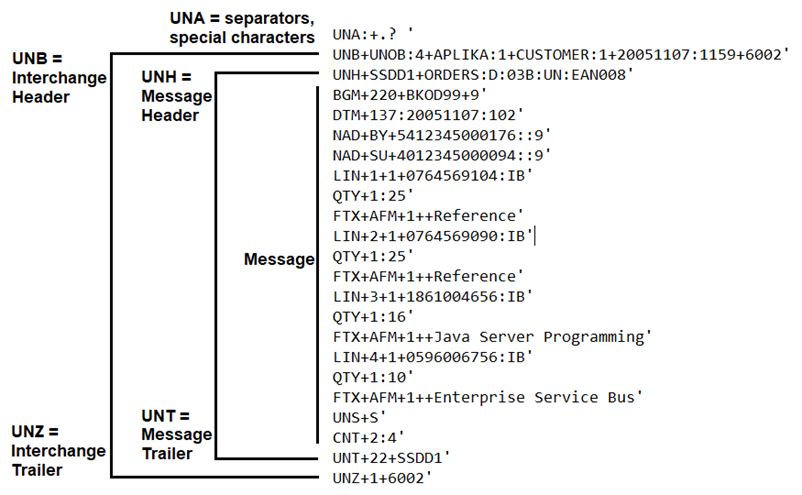
EDIFACT is not as readable as formats like XML and JSON. EDIFACT was developed to be as compact as possible to save space and simplify processes. In EDIFACT, variable names are predefined, and their purpose is determined by the code that follows them, for example, QTY+1. EDIFACT is roughly divided into three sections: header, message, and trailer. The header section contains information about the sender and receiver, while the trailer section contains information about the message. The message section contains the actual content, such as order details, and is divided into elements and segments, which can contain elements or segments containing elements. The elements belonging to segments are not directly apparent from the data, but the elements belonging to a segment can be checked from the syntax of the specific EDIFACT format. For example, BGM and DTM belong to the same segment in the example.
Who Uses EDIFACT and Why?
EDIFACT is particularly used in the retail and logistics sectors, where there is a significant movement of goods, invoices, and shipments. The most commonly used messages include the previously mentioned ORDER for sending order information and INVOIC for billing information, but also popular are DELJIT and DELFOR, which customers can use to send short or long-term forecasts to suppliers. EDIFACT's strength lies in its large number of different standards for various needs.
The structure of EDIFACT is also one of its advantages. Messages like XML or JSON are simpler to read, even if you're not familiar with them, but their file size is higher for this reason. EDIFACT messages are comparatively short and compact, and the file size may be several times smaller. EDIFACT was not really developed to be read directly by humans, but as an intermediate message format between different systems, which is where the abbreviation EDI, Electronic Data Interchange, comes from.
Differences from Other Formats
When comparing to other common formats like JSON and XML, the appearance of EDIFACT
is the first thing that stands out. EDIFACT is compactly formatted into segments using
fields according to the format's naming convention, such as FTX (free text), DTM (date/time),
and QTY (quantity). The format also defines the field type with a code, for example, DTM+137
would be equivalent to <DocumentDate> in XML, and DTM+36 is <ExpiryDate>.
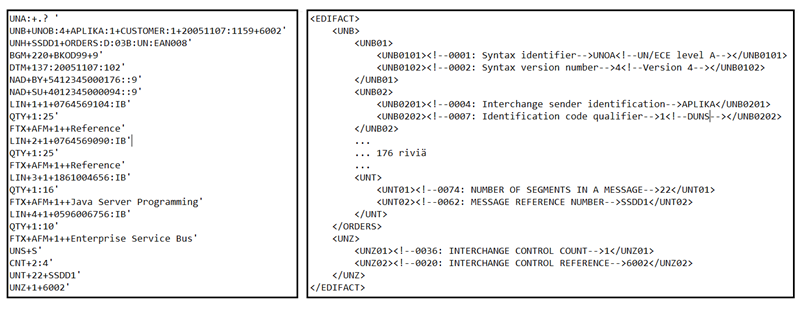
In addition to structure, there are also differences in possible data transmission methods. EDIFACT can be sent mostly through traditional data transfer methods such as SFTP, AS2, and HTTP, while XML and JSON enable the use of REST interfaces, for example. When comparing to other EDI formats like X12, the differences are ultimately small, and the choice of format largely depends on which other entities you are collaborating with. For instance, X12 is a format very similar to EDIFACT, especially in structure, with the biggest differences mainly being in terms and abbreviations, but it is primarily used in the North American market, while EDIFACT is mostly used in Europe and Asia.
EDIFACT in Boomi
Many systems can natively read EDIFACT, for example, in a situation where a customer sends an ORDER EDIFACT and it can be fed directly into the order system. But what if the order system doesn't read EDIFACT, but instead JSON, or it retrieves its data from a database into which the information from EDIFACT must first be read? Or if a customer sends an XML-formatted order form, but your system reads EDIFACT.
Making transformations to EDI-type messages is not the simplest task, and the complexity largely depends on the capabilities of the integration platform. For example, Mulesoft can transform EDIFACT into a more readable form using an EDI connector. But in most other platforms, such functionality may not be available, and you have to write the structure into the integration from scratch, or look for models made by other developers.
Boomi Trading Partner View Communication Methods, Which Can Be Multiple for the Same Trading Partner
Boomi has solved the EDI question with Trading Partners. Trading Partners are used to define configurations for your own company and partners. A Trading Partner is defined with the format being used, such as EDIFACT, X12, or HL7, and different data transfer protocols like SFTP, HTTP, and Disk. After this, all necessary message type profiles with their versions are available for EDI file transformation, for example, an ORDER message with D.96A version.
Trading partner licenses work a bit differently from other Boomi licenses. Normally, licenses are for each connection installed in environments, but in this case, they are specific to Trading Partners. Multiple different data transfer protocols can be defined for Trading Partners, and since they are billed from the Trading Partner license instead of the connection license, it's also possible to reduce costs, especially if a customer shares EDI files in multiple different ways.
Boomi B2B/EDI Dashboard for Clearer Reading of EDIFACT Messages
Boomi also offers a B2B/EDI Dashboard for Trading Partners. From the Dashboard, you can read EDI files in a more human-readable form and, for example, search for messages related to a specific order that have passed through Boomi.